
Invograb vs Tailride: Which Tool Works Best for You?
A detailed comparison to help you choose with confidence

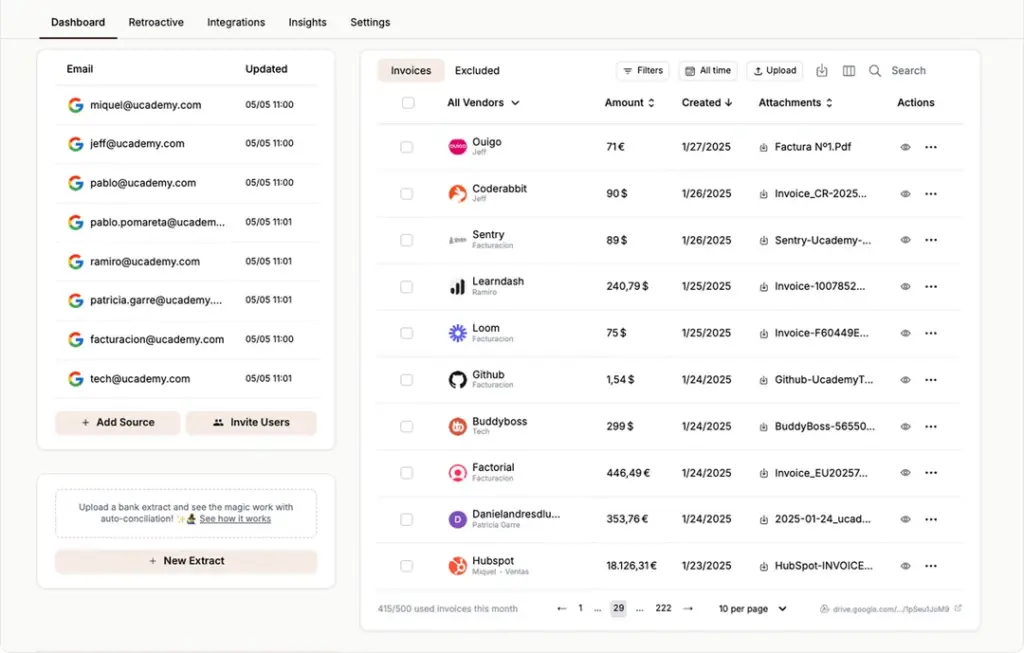
What is Tailride?
Tailride is an AI-powered invoice automation tool built around email inbox scanning and browser-based portal retrieval. It connects natively to Gmail, Outlook, and IMAP accounts to find and extract invoices automatically — whether they arrive as PDF attachments, inline email content, or links to external documents. Beyond email, Tailride’s Chrome extension allows users to pull invoices directly from 30+ vendor portals including Amazon, Meta Ads, Adobe, and Notion using their existing browser session — no portal credentials required.
With over 25,000 businesses onboard and 70,000+ invoices processed every month, Tailride is one of the most widely adopted tools in its category. It also supports physical receipt capture via WhatsApp and Telegram, bank statement reconciliation, and direct integrations with QuickBooks, Xero, Google Drive, DATEV, and more.
Key Features:
- Native Gmail, Outlook, and IMAP inbox scanning
- Chrome extension for one-click vendor portal extraction (30+ portals: Amazon, Meta Ads, Adobe, Notion, ChatGPT, Microsoft, and more)
- Physical receipt capture via WhatsApp and Telegram bot
- Retroactive scanning of full inbox history ("All Time" option)
- Bank statement reconciliation with AI transaction matching
- Custom AI rules for automatic categorization and tagging
- Integrations: QuickBooks, Xero, Business Central, Google Drive, Google Sheets, OneDrive, DATEV
- Free plan available (up to 10 invoices/month); paid plans from $19/month for 50 invoices
Tailride is a genuinely strong product — one of the most feature-complete tools in this space — and in some scenarios, it’s the right choice. We’ll cover exactly when below.
Invograb Goes Deeper Where It Counts
Invograb is a full invoice automation platform built for teams that need more than raw extraction — they need data that’s actually ready for accounting.
Where most tools capture totals, dates, and vendor names, Invograb extracts the full invoice structure: line items, tax breakdowns, PO numbers, currencies, payment terms, and more. That’s structured data you can send directly into your accounting workflow without a cleanup step.

Invograb does not charge per-invoice fees. Pricing is flat and scales with your business size, not your document volume — meaning a high-volume month costs the same as a quiet one. Setup requires no manual rules or filters: connect your inbox, and the AI begins processing both new and historical invoices immediately, typically within 5 minutes of onboarding.
Invograb supports 3 native email providers (Gmail, Outlook, IMAP), 6 export formats (CSV, Excel, Google Sheets, JSON, API, webhooks), and multiple simultaneous inboxes under a single account with role-based permissions.
Why choose Invograb:
Smart AI and Deep Extraction

Captures totals, line items, taxes, PO numbers, currencies, and payment terms — not just the basics. Invograb extracts at least 12 distinct data fields per invoice, giving you fully structured, accounting-ready output.
Multi-Inbox Support

Monitor multiple email accounts simultaneously under a single Invograb account — no added cost per inbox, no extra configuration needed. Designed for finance teams and bookkeepers managing more than one business.
Team Collaboration

Shared access with role-based permissions so you control exactly who can view, export, or manage invoice data. No extra seat fees for read-only team members.
Bulk Scanning

Recover years of past invoices in a single batch operation. Choose any custom date range — day, week, month, quarter, year — and Invograb processes everything automatically.
Adaptive AI That Learns

Invograb’s AI improves extraction accuracy over time as it processes more documents from your specific vendors and formats. Unlike rule-based configuration, no manual tuning is required.
Flexible Export Options

Push structured invoice data to CSV, Excel, or Google Sheets — or connect directly to your internal systems via API and webhooks without third-party middleware.
Predictable, Flat Pricing

Invograb does not use per-scan or per-invoice pricing. A business processing 500 invoices/month pays the same rate as one processing 50. No surprise charges at month-end.
Enterprise-Grade Security

Encrypted storage, secure OAuth authentication, audit-ready logs, and full data protection built for teams where compliance is non-negotiable.
Invograb vs Receiptor.ai: Side-by-Side Comparison
Invograb | Tailride | |
Pricing model | Flat — no per-invoice caps | Usage-based from $19/mo (50 invoices) |
Free plan | ✅ | ✅ (up to 10 invoices/month) |
Email providers | Gmail, Outlook, IMAP (3 providers) | Gmail, Outlook, IMAP (3 providers) |
Vendor portal extraction | Email-native (no browser extension needed) | ✅ Chrome extension — 30+ portals |
Physical receipt capture | Email & PDF upload | ✅ WhatsApp & Telegram bot |
Data fields extracted per invoice | 12+ (line items, taxes, PO, currency, payment terms) | Core fields (total, date, vendor, category) |
AI learning | ✅ Adaptive — improves with use, no manual rules | Rule-based custom configuration |
Multi-inbox team support | ✅ Unlimited inboxes, role-based permissions | Multi-user, basic permissions |
Bank reconciliation | ✅ | ✅ |
Export formats | 6 (CSV, Excel, Sheets, JSON, API, webhooks) | CSV, Google Sheets, accounting integrations |
Accounting integrations | QuickBooks, Xero, API-first | QuickBooks, Xero, Business Central, DATEV |
DATEV support | ❌ | ✅ |
Historical bulk scanning | ✅ Any custom date range | ✅ Preset ranges including “All Time” |
Setup time | Under 5 minutes, zero manual rules | Under 5 minutes |
Security | Encrypted storage, OAuth, audit logs | CASA Tier 2 certified |
GDPR compliant | ✅ | ✅ |
Choose Tailride if you:
- Regularly retrieve invoices from vendor portals (Amazon, Meta Ads, Adobe) and want a Chrome extension workflow across 30+ portals
- Have employees sending physical receipts via WhatsApp or Telegram
- Use DATEV format for German-standard accounting
- Prefer starting on a low-cost usage-based plan before committing
- Want to be part of a large, established user community with a proven track record at scale
Choose Invograb if you want:
- Need structured, accounting-ready data including line items, tax breakdowns, PO numbers, and payment terms — not just totals
- Want flat pricing with no per-invoice fees and no surprise costs at month-end
- Manage multiple inboxes or work across several businesses from a single account
- Prefer adaptive AI that improves accuracy over time rather than manually configuring extraction rules
- Need flexible export via API or webhooks to push data directly into internal systems
- Require enterprise-grade security with audit logs and encrypted document storage
Make invoice and receipt extraction fully automatic.
Richer data, better AI, scalable pricing.
How to switch to Invograb
Our migration process makes sure that you have a smooth transition so there is no data loss and you can start enjoying the benefits of AI-powered automation in Invograb right away.
When you switch to Invograb, you’ll get:
- Free migration assistance from our team
- Extended free trial period
- No setup fees or hidden costs
- 30-day money-back guarantee
- Dedicated onboarding support to get you processing invoices on day one
- 1. Export your receipts/invoices from Receiptor (CSV or PDF)
- 2. Create an Invograb account.
- 3. Connect your email accounts and upload any PDFs with one-click setup
- 4. Launch AI-Powered Invoice Collection
Invograb vs. Receiptor.ai - FAQ
Main difference between Invograb and Tailride?
The primary difference is extraction depth and pricing structure. Invograb extracts 12+ data fields per invoice — including line items, tax breakdowns, PO numbers, currencies, and payment terms — compared to Tailride’s core field extraction (totals, dates, vendor names, categories). Invograb does not charge per-invoice fees; pricing is flat regardless of volume. Tailride charges usage-based from $19/month for 50 invoices. Tailride’s distinct advantage is its Chrome extension, which pulls invoices from 30+ vendor portals directly — a workflow Invograb does not replicate.
Which tool is better for accounting teams managing multiple clients?
Invograb is the stronger fit for accountants managing multiple clients. It supports unlimited simultaneous inboxes under one account with role-based permissions, processes years of historical data in bulk with custom date ranges, and exports structured line-item data ready for reconciliation. Tailride’s multi-user support is available but optimized primarily for single-business use.
What data fields does Invograb extract?
Invograb extracts at least 12 structured fields per invoice: vendor name, invoice number, issue date, due date, currency, subtotal, tax amount, total, line items, PO number, payment terms, and document type. This is significantly more than tools that capture only totals and dates.
Does Invograb charge per invoice?
No. Invograb does not use per-invoice or per-scan pricing. You are never charged based on document volume. Tailride’s plans are usage-based and priced by invoice volume starting at $19/month.
Does Invograb support vendor portal extraction?
Invograb is built around email-native invoice capture, which is where the vast majority of B2B invoices arrive. Invograb does not have a Chrome extension for vendor portal access. If your workflow depends on downloading invoices from portals like Amazon, Meta Ads, or Adobe, Tailride’s Chrome extension is a genuine advantage for that specific use case.
What export formats does Invograb support?
Invograb supports 6 export formats: CSV, Excel, Google Sheets, JSON, API (REST), and webhooks. Data can be pushed directly to internal systems without third-party middleware. Tailride supports CSV, Google Sheets, and direct accounting integrations (QuickBooks, Xero, Business Central, DATEV).
Does Invograb support DATEV format?
No. Invograb does not currently support DATEV export. If you use German-standard DATEV accounting workflows, Tailride supports this natively.
How long does Invograb take to set up?
Invograb requires no manual rule configuration. Connecting your inbox and beginning to process invoices — including historical ones — takes under 5 minutes. No filters, no category rules, no template setup required.
Is Invograb GDPR compliant?
Yes. Invograb is GDPR compliant, with encrypted document storage, OAuth-based authentication, and audit-ready access logs. Tailride is also GDPR compliant and holds CASA Tier 2 security certification.
Can I scan old historical invoices in Invograb?
Yes. Invograb supports bulk retroactive scanning across any custom date range — a specific day, week, month, quarter, year, or multi-year period. Processing is fully automated once the range is selected.