



At Invograb, we spend a lot of time in the invoice automation space — and every so often, a tool comes along that genuinely raises the bar for what’s possible. Tailride is one of them.
In this spotlight, therefore, we take a close look at what Tailride does, who it’s built for, and, as a result, why it has become one of the most trusted invoice automation platforms globally.
For a detailed feature-by-feature breakdown of how Tailride compares to Invograb, see our Invograb vs Tailride comparison page.
What Is Tailride?
Tailride is an AI-powered invoice and receipt automation platform that connects directly to your email inbox, online vendor portals, and bank statements to capture, extract, and organize invoices — with no manual work required.
Based in Luxembourg, the platform is trusted by 25,000+ businesses worldwide and processes over 70,000 invoices every month. It supports Gmail, Outlook, and all IMAP-compatible email providers, and integrates natively with QuickBooks, Xero, Microsoft Business Central, DATEV, Google Drive, Google Sheets, and OneDrive.
Tailride holds CASA Tier 2 security certification — validated by the App Defense Alliance — and is fully GDPR compliant, with all user data stored within the European Union.
Built for Every Stage: From Freelancers to Enterprise
One of Tailride’s clearest strengths is how well it scales across business sizes without changing tools or workflows.
Freelancers and Solo Operators
Tailride’s free plan handles up to 10 invoices per month indefinitely — with zero credit card required. The Starter plan at $13/month (billed annually) covers up to 900 invoices per year across 2 connected email accounts, includes web portal extraction via the browser extension, bank statement reconciliation, and unlimited users. As a result, for a freelancer or solo founder, this is a complete, production-ready solution at a price point that’s hard to beat.
Small and Mid-Sized Businesses
As invoice volumes grow, Tailride scales cleanly. The Growth plan at $34/month supports 4,200 invoices annually across 8 connected email accounts. The Scale plan at $69/month covers 9,000 invoices annually across 20 inboxes with 12-hour priority support. Both plans include the full feature set: Chrome extension for portal retrieval, AI-powered categorization rules, bank reconciliation, multi-currency support, and all integrations.
In particular, Tailride’s retroactive scanning is valuable for fast-growing companies — for example, you can recover all historical invoices from a custom date range, including “All Time,” in a single automated pass. No manual downloads, no inbox digging.
Accounting Firms and Multi-Client Practices
Tailride has a dedicated program for accounting professionals managing 10+ clients. It includes a Master Dashboard with a single view across all client accounts, volume-based custom pricing, a flexible billing model (Tailride invoices the firm; the firm bills clients however they prefer), and a dedicated accounting firm support line.
Consequently, this eliminates the most painful part of the job: chasing clients for missing invoices. As a result, the firm has real-time visibility into all client invoices without any back-and-forth.
Enterprise Finance Teams
The Premium plan at $138/month covers 18,000 invoices annually across unlimited connected email accounts with 8-hour priority support and the Email Routing add-on included. An even larger Enterprise plan is available at $277/month offering 36,000 annually processed invoices. Furthermore, Tailride supports custom AI rules that can be configured in minutes. For instance, rules can automatically tag invoices by project, exclude specific vendors, set tax rates, apply due date logic, and handle invoice type filtering. One-time credit bundles that never expire are also available for burst workloads or seasonal volume spikes.
Key Features
Capture and Extraction
AI Inbox Scanning
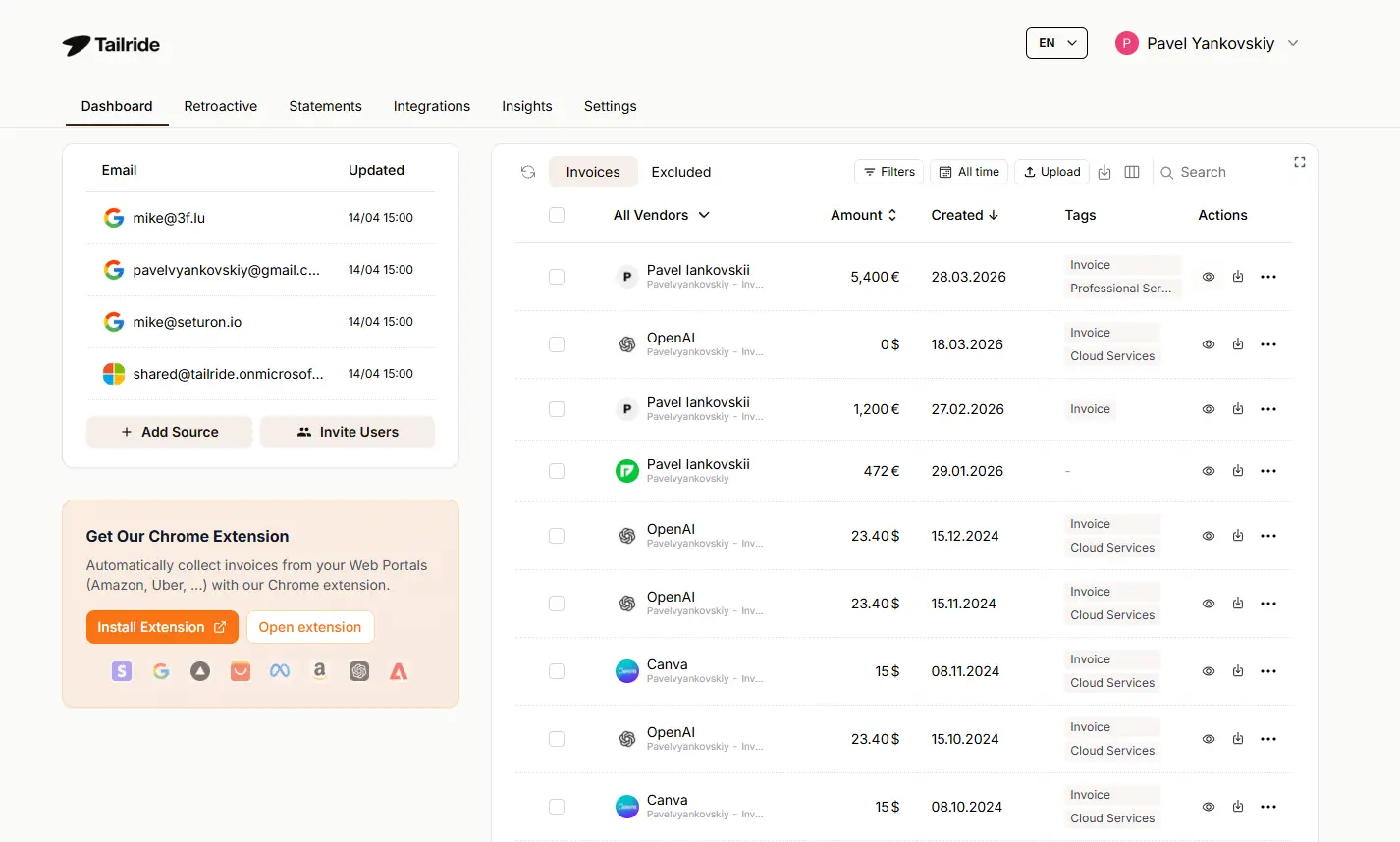
Tailride connects natively to Gmail, Outlook, and IMAP accounts. It finds invoices regardless of format — PDF attachments, images, inline email content, or links to external documents. You can connect multiple colleagues’ inboxes at the same time. Importantly, invoices are never forwarded to a third-party address — Tailride uses a native email connection throughout.
Retroactive Historical Scanning
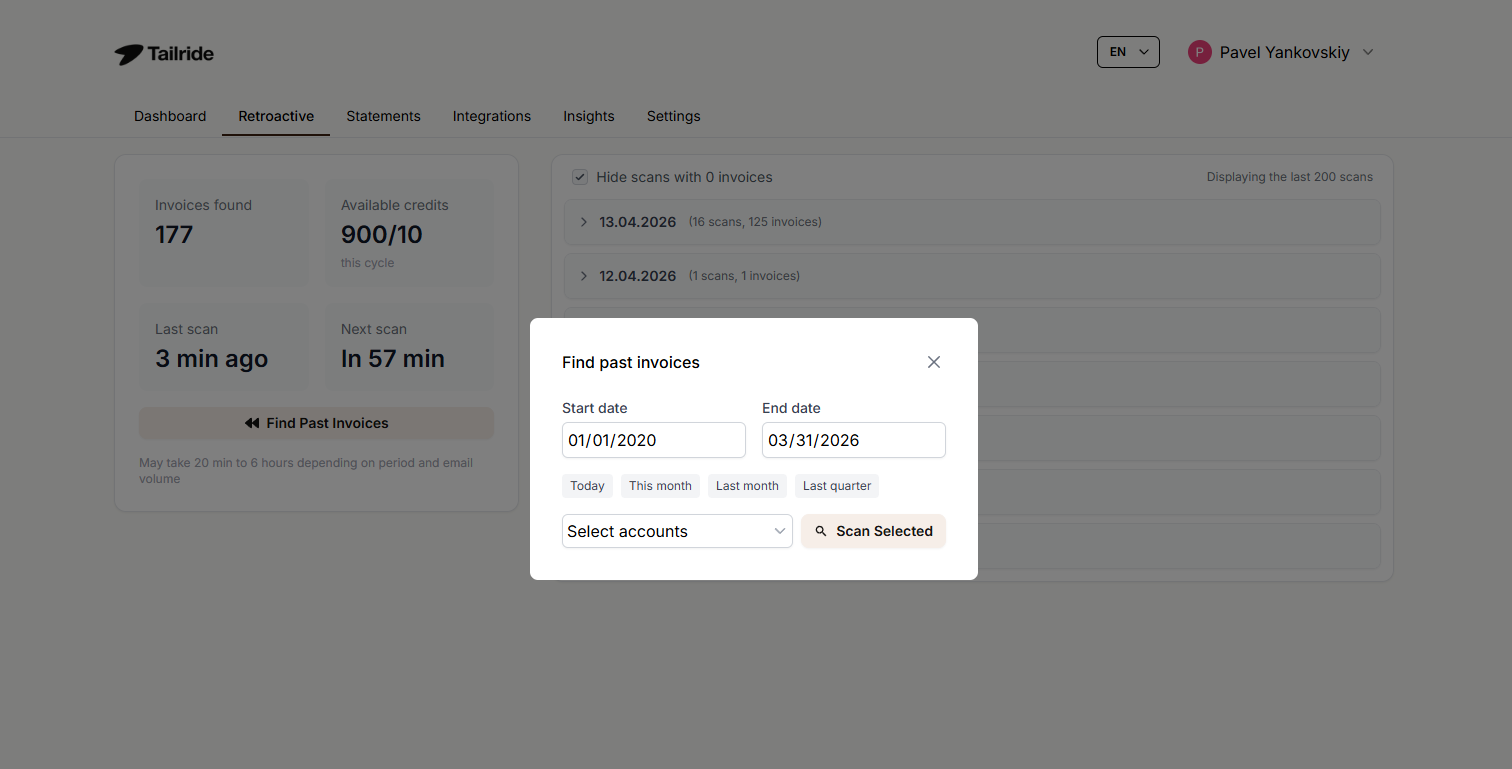
Choose how far back you want Tailride to search: this month, this quarter, this year, a custom date range, or all time. All past invoices are then processed on their own, with no manual steps required.
Chrome Extension for 20+ Vendor Portals
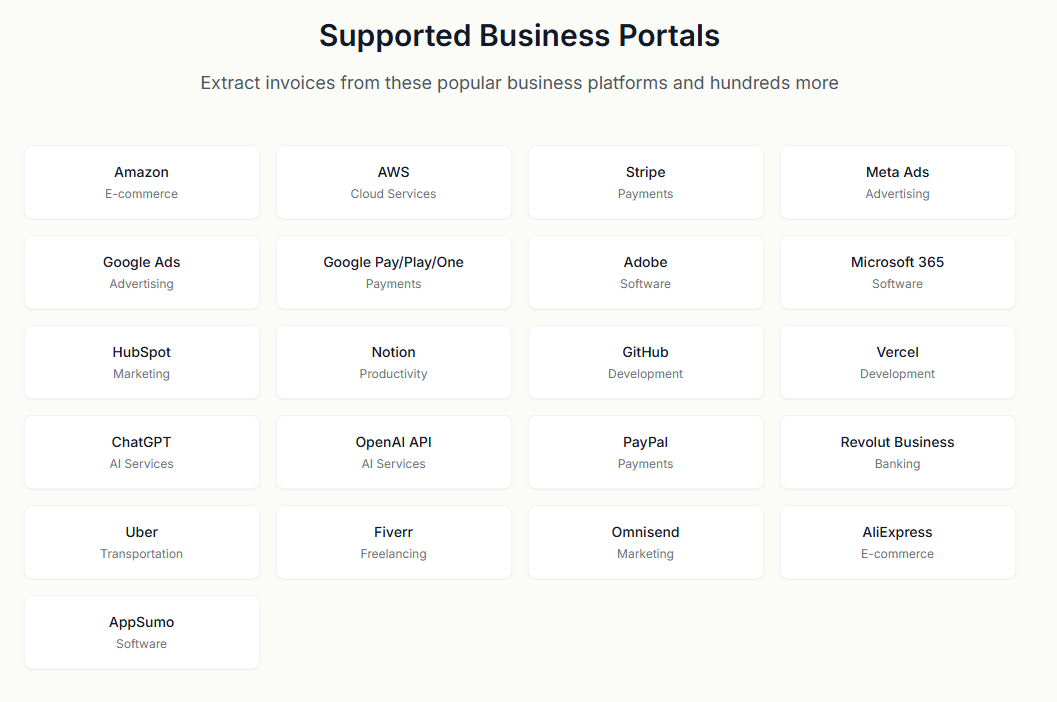
Tailride’s browser extension retrieves invoices directly from Amazon, Meta Ads, Adobe, Notion, Microsoft, ChatGPT, and 20+ other portals — using your existing browser session. As a result, there is no need to share portal credentials. One click on the extension delivers all portal invoices to your dashboard.
WhatsApp and Telegram Receipt Bot
Employees capture physical receipts by photographing them and sending them to the Tailride WhatsApp or Telegram bot. Receipts are then processed on their own and appear in the dashboard alongside email invoices. Unlimited users can be linked to the bot at no additional cost.
Processing, Integrations, and Add-Ons
Custom AI Processing Rules
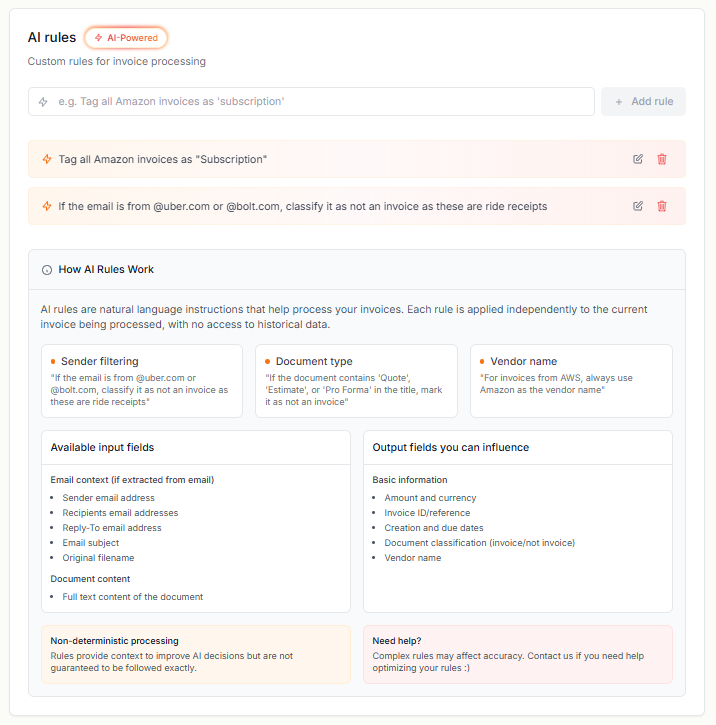
Set rules once, and Tailride’s AI applies them to every invoice going forward. For example, rules can handle vendor exclusions, tag assignment, project sorting, due date overrides, tax rate assignment, and invoice type filtering — all configurable in under 5 minutes.
Bank Reconciliation
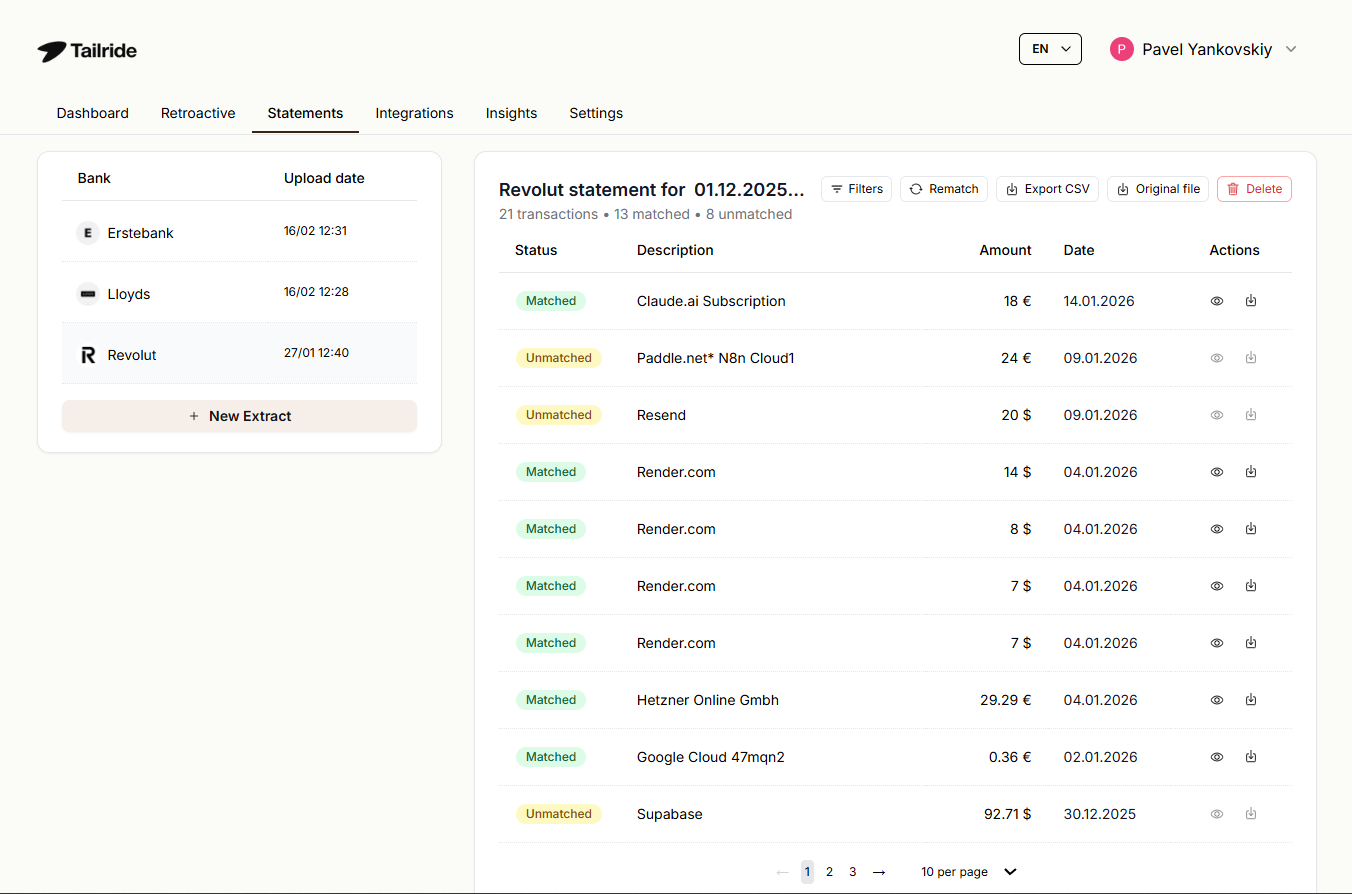
Upload bank statements in PDF or CSV format. Tailride’s AI then matches transactions against extracted invoices, identifies missing documents, and handles multi-currency matching on its own — for instance, USD expenses against EUR bank transactions.
Integrations
Native integrations with QuickBooks (detailed bills and expenses), Xero (fully detailed bills), Microsoft Business Central, Google Drive (organized invoice storage), Google Sheets (invoice data export), OneDrive, and DATEV (XML export for German-standard accounting). Additionally, new integrations can be requested via Tailride’s public feature board.
Add-Ons
Email Routing ($20/month or $160/year): Automatically forward processed invoices to any email address after extraction
One-Time Credit Bundles: For businesses with seasonal spikes or one-off high-volume months, Tailride sells invoice credit bundles separately. Credits never expire and don’t require a plan upgrade
Pricing at a Glance
All paid plans include web portal extraction, bank reconciliation, unlimited users, and priority support. Annual billing includes 4 months free. First-month credits are doubled on all monthly plans. A full refund is available within 3 days of payment.
Who Should Use Tailride?
In summary, Tailride is the right fit if you recognize any of the following situations:
You receive invoices across multiple inboxes and need a single automated system to capture everything without manual forwarding
Your team regularly downloads invoices from vendor portals like Amazon, Meta Ads, Adobe, or Notion and wants a one-click setup
You need to recover years of past invoices quickly, without manual downloading or sorting
You’re an accounting firm managing 10+ clients and need a master dashboard with centralized visibility and volume pricing
You use DATEV and need XML-format exports for German-standard accounting workflows
Your business is growing and you need pricing that scales with headcount and volume without switching tools
For more info – visit Tailride’s official website.
Frequently Asked Questions
How many invoices can Tailride process per month?
Tailride processes over 70,000 invoices per month across its user base. Individual plan limits range from 10 invoices/month on the free plan to 1,000+/month on the Premium plan. Additionally, one-time credit bundles with no expiration are available for even higher volumes.
Does Tailride work with any email provider?
Yes. Tailride connects natively to Gmail, Outlook, and all IMAP-compatible email providers. Importantly, it does not require email forwarding — it uses a direct native connection so your emails never leave your inbox.
What vendor portals does the Chrome extension support?
The Tailride Chrome extension supports 20+ portals including Amazon, Meta Ads, Adobe, Notion, Microsoft, and ChatGPT. Furthermore, it uses your existing browser session to retrieve invoices, so you never need to share portal login credentials with Tailride.
Does Tailride support historical invoice recovery?
Yes. When you first connect your inbox, Tailride can retroactively scan for past invoices. Options include this month, this quarter, this year, a custom date range, or all time. As a result, processing is fully automated from the moment you select your range.
Is Tailride suitable for accounting firms managing multiple clients?
Yes. Tailride has a dedicated accounting firm program with a Master Dashboard for centralized client visibility, volume pricing for firms with 10+ clients, and a dedicated support line. Moreover, it integrates natively with QuickBooks, Xero, Google Sheets, and DATEV.
What accounting software does Tailride integrate with?
Tailride integrates natively with QuickBooks Online, Xero, Microsoft Business Central, DATEV (XML format), Google Drive, Google Sheets, and OneDrive. In addition, new integrations can be requested on Tailride’s public feature board.
Is Tailride secure and GDPR compliant?
Yes. Tailride is GDPR compliant with all user data stored within the European Union. Furthermore, it holds CASA Tier 2 security certification validated by the App Defense Alliance and provides a Data Processing Agreement (DPA) on request.
What is Tailride’s refund policy?
Tailride offers a full refund within 3 days after payment. There is no long-term contract — consequently, plans can be upgraded or downgraded at any time with immediate prorated adjustments.